
There is a moment in FHIR integration work where a validator dumps forty issues in your lap and the whole thing feels like reading a compiler stack trace at 4am. The output is technically correct. It is also not shaped like anything a human can act on. The fix is to stop reading it as a log and start reading it as a checklist you can walk from top to bottom.
For the wider framing of why validation output looks the way it does, what really breaks when you skip Bundle validation covers the categories of issue, and interoperability primers and references collects the rest of the series on the home page. This piece is about the reading habit that turns forty issues into ten decisions.
Collapse Duplicates First
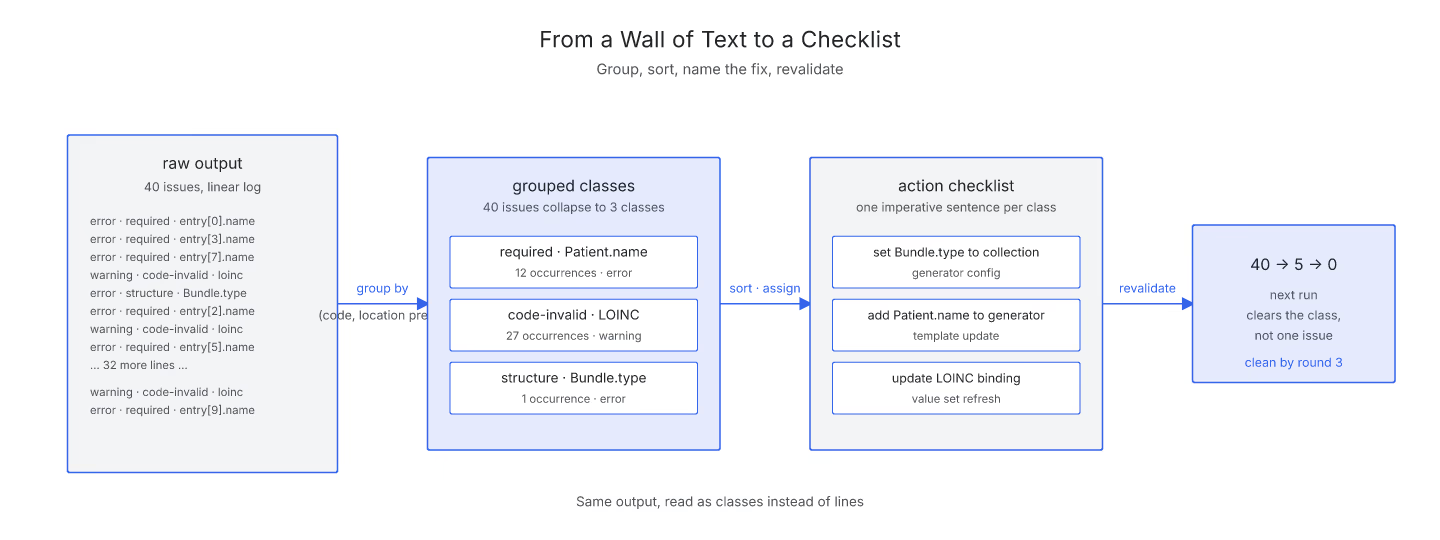
The first pass through a fresh validation output is a deduplication pass, not a fix pass. Two issues that carry the same code, the same severity, and the same shape of location are almost always the same underlying bug repeated across entries. Forty issues can collapse to eight distinct classes.
The habit is to skim first, group second, and only then start fixing. Trying to fix each issue as you read it linearly is what makes the output feel infinite. For the specific field-level reading order, how to read a FHIR validation error walks through the four fields that matter most.
Sort by Severity Once Grouped
After deduplication, sort the classes by severity. Fatal issues at the top, errors below, warnings after that, information at the bottom. The classes at the top of the sorted list are what decides whether the Bundle can even be resubmitted; the ones at the bottom are usually notes for later.
This is where a validation checklist earns its keep. Instead of forty scattered lines, you have a small ordered list where each entry represents one action you can take. Ten entries at most, usually fewer once you have collapsed duplicates.
Attach a Fix to Each Class
For each class in your checklist, write down the one fix that resolves it. "Add identifier to every Patient." "Set Bundle.type to collection." "Update the LOINC binding from the deprecated code to the current one." One action per class is enough; specifics come in the code change itself.
The point of this step is to force yourself to name the fix before you touch the code. Validators are precise, but they emit at a level of detail that hides the intent. Rewriting each class as one imperative sentence flips the output from "here are the symptoms" to "here is what to do".
Revalidate and Watch the List Shrink
The last step is the loop. Apply the fixes, revalidate, and watch the checklist collapse. A single fix usually clears several related issues at once. What was a forty-issue output often becomes a five-issue output on the second run, and clean by the third.
Running this loop inside a CI setup means the checklist is built into the pipeline. Every commit produces a fresh output, and every regression shows up as a specific class you can address before merge. For quick one-off checks, the site's Bundle validator is the interactive version of the same loop.
Why the Habit Matters
Reading validation output as a checklist is what turns Bundle work from painful into routine. A wall of text feels like it takes an hour to fix. A checklist of eight items feels like an afternoon at worst, and half a morning at best. Same output, different reading. That is where the time savings live.
Sources
- HL7 IG Publisher Documentation - HL7 Confluence IG Publisher Documentation, canonical validation-output tooling docs including the qa.html grouping model