
There is a specific flavor of frustration in FHIR integration work: your Bundle passes every validator you can find, your CI is green, you push it to the partner, and it comes back rejected with a terse OperationOutcome. The impulse is to assume the receiver is wrong. Usually the receiver is right, and the local validators just did not have the same profile package loaded.
For the shared vocabulary on how validation stacks, what really breaks when you skip Bundle validation is worth a skim first, and more on healthcare data exchange sits alongside it on the home page for the wider context. This piece is about the specific case where local passes and remote does not.
Why Local and Remote Disagree
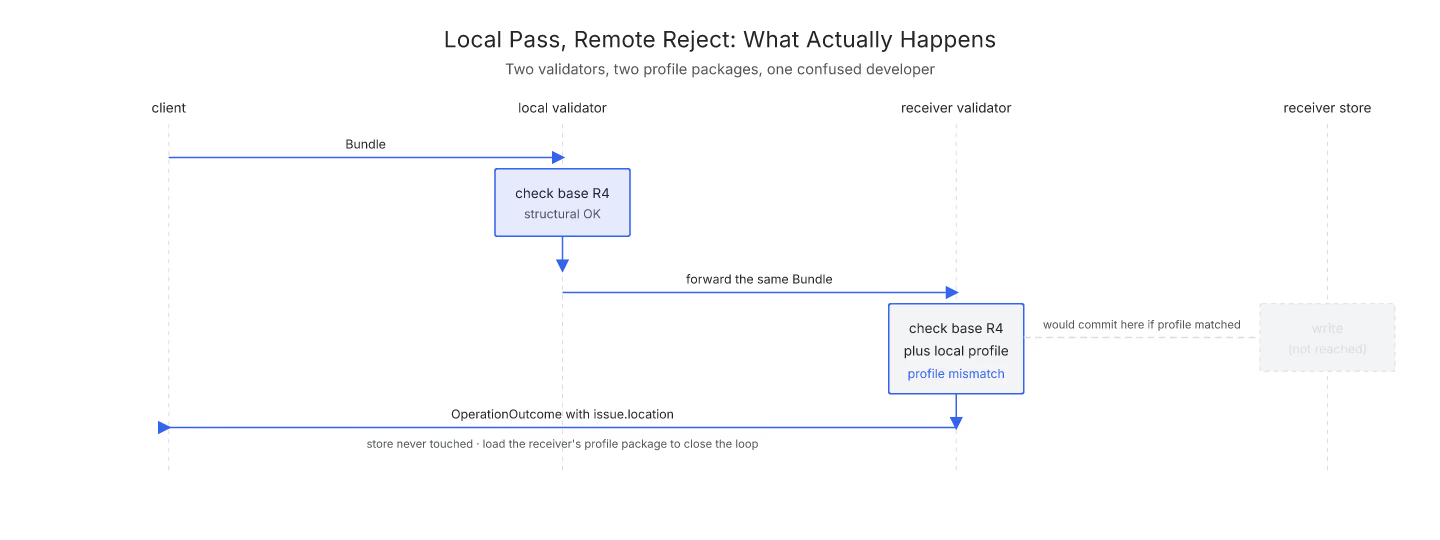
The core reason is that a validator is only as strict as the profiles it has loaded. Your local validator likely knows the base R4 spec, maybe US Core, maybe a few IGs you added. The receiver's validator knows the same base spec plus its own profile package, its own value sets, its own local extensions.
A Bundle can be legal against the base spec and illegal against a specific profile. Both statements are true. The failure is not that either validator is wrong; it is that they were checking different rules.
The Three Most Common Divergence Types
Version binding drift is the first. Your Bundle uses code X from a value set the partner has since narrowed. The code still exists, it is still valid FHIR, but the partner's profile now requires a subset that no longer includes X. The OperationOutcome will say code-invalid with a hint at the specific value set.
Cardinality tightening is the second. A field the base spec allows to be missing has been marked required by the partner's profile. Patient.identifier is a frequent example: base R4 says 0.., US Core says 1... If your generator does not populate it, structural validation passes locally and fails at the partner.
Custom extensions are the third. The partner may require an extension that is not part of any published IG you have loaded. A local validator has no way to know it is required; the receiver's validator does, and it fails.
Read the Rejection Carefully
The first move after a receiver rejection is to read the OperationOutcome the receiver returned. The location or expression field points at the exact FHIRPath where the mismatch lives. The code narrows down which class of problem you have (code-invalid for terminology, required for cardinality, structure for shape, not-supported for verbs).
If the receiver returned an issue on Patient.identifier with code: required, the fix is generator-side: add the identifier. If the issue points at an extension URL you have never seen, the fix is to ask the receiver for their profile package or IG link.
Close the Loop by Loading the Receiver's Profile
The permanent fix is to load the receiver's profile package into your local validator. Most partners publish an IG, or at least a StructureDefinition, that describes what they enforce. Adding that to your local validator turns "passes locally, fails remote" into "passes both". If you have a CI setup for Bundle validation, the receiver's profile package should live there alongside your own.
The site's Bundle validator can help you triage against the base spec quickly, and once you know the receiver's specific profile, the same shape of check applies with the profile loaded.
Batch, Transaction, and the Receiver's Story
One more layer: the receiver's response depends on whether the Bundle was batch or transaction. A batch receiver returns a mixed success/failure response Bundle. A transaction receiver returns a single OperationOutcome and rolls back the whole thing. If you are not sure which behavior you saw, the batch vs transaction comparison untangles it.
Every remote rejection has a specific reason. The trick is to treat it as data, not as an insult.
Sources
- HL7 US Core Implementation Guide (STU 6.1.0) - HL7 US Core Implementation Guide STU 6.1.0, canonical partner-profile package that receivers commonly enforce